Code intelligence
OctoPunk provides a code intelligence panel, powered by local LSP servers.
The code intelligence feature supports a subset of the familiar tools we have grown accustomed to in our editors.
When enabled OctoPunk's file viewer becomes symbol aware. Hovering details, go-to definitions, and symbol search begin to work, both for the current file and across files.
The following video clip gets you acquainted with the code intelligence system.
Configuration
OctoPunk will attempt to find language servers in the user's PATH.
You can determine what LSP servers were detected by opening ⌘+PSettings and navigating to the LSP section.
If your desired LSP is not detected you can supply a path directly to the binary.
Usage
When OctoPunk detects a repo contains code that a configured LSP supports, it will prompt the user to enable code intelligence when browsing files in the repository.
To keep things efficient, OctoPunk runs a single language server per repository per language. All files of the same language within a repo share that server, and OctoPunk shuts it down automatically when you close the repository or switch accounts.
By clicking on either the lightning icon at the top of the repository page, or in the menu bar of a viewed file, you will open the code intelligence enable dialogue.
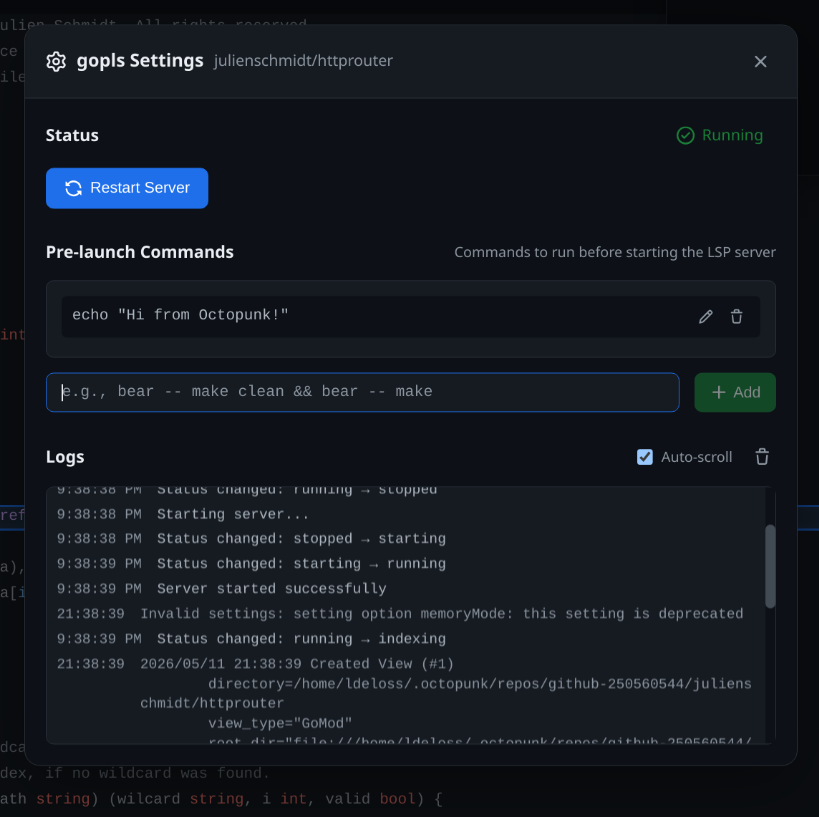
This dialogue will have a per-repository settings page for each LSP that is persisted over OctoPunk restarts. The settings page allows the user to define one or more pre-launch commands and view logs for the LSP server.
Pre-launch commands are shell commands which are run just prior to enabling the LSP. This can be handy for LSPs and projects which need to create artifacts for the LSP to function. Most notably this can be used to generate a compile_commands.json file for the clangd language server, among many other use cases.
Once enabled, the code intelligence panel will be displayed and the features outlined in the above demonstration video are available.